A CompTIA Linux+ practice test can show you the shape of a four-option question, and most of XK0-006 is exactly that. What it cannot show you is the other kind of item. CompTIA Linux+ (V8), exam code XK0-006, mixes multiple-choice questions with performance-based items, and on those you are not asked which command is right, you are asked to produce a working result. The exam runs for 90 minutes, carries up to 90 items, and is scored on a 100 to 900 scale with 720 to pass. Those figures are easy to find.
What candidates ask in the CompTIA instructor forums is harder: how different is the hands-on part, and how do you rehearse for it with a practice set that only has radio buttons? This article answers that domain by domain. It covers what the five XK0-006 domains weigh, what a performance-based item can reasonably demand in each one, how the exam moved on from XK0-005, what the $399 fee buys you if you fail, and how the credential is kept alive once you pass.
What Does a CompTIA Linux+ Practice Test Actually Have to Cover?
A CompTIA Linux+ practice test has to cover two item types and five domains. XK0-006 presents up to 90 items in 90 minutes, some multiple-choice and some performance-based, and it passes at 720 on a 100 to 900 scale. A practice set that only drills the multiple-choice half leaves the hands-on half, and the clock pressure it creates, untested.
The exam facts below come from the EduSum XK0-006 listing and agree with the CompTIA Linux+ exam details displayed on the vendor’s own page. CompTIA adds one detail the listing does not: 90 is a maximum, not a fixed count, because performance-based items take longer and the paper is balanced for time.
| Exam detail | XK0-006 |
|---|---|
| Certification | CompTIA Linux+ (V8) |
| Exam code | XK0-006 |
| Items | Up to 90, multiple-choice and performance-based |
| Time | 90 minutes |
| Passing score | 720 on a scale of 100 to 900 |
| Fee | $399 (USD) |
| Delivery | Pearson VUE |
| Language | English |
| Launched | 15 July 2025 |
Two more facts matter for planning. CompTIA recommends 12 months of hands-on work with Linux servers before you sit XK0-006, with A+, Network+ or Server+ or equivalent knowledge behind you. The exam is ISO accredited through the ANSI National Accreditation Board, which is why it appears on so many public-sector job specifications. Neither fact changes the paper, but both tell you who it was written for: someone who already runs Linux machines, not someone learning the shell.
“CompTIA Linux+ (V8) validates your ability to manage, secure, automate and troubleshoot Linux systems in cloud and hybrid environments.”
How Are the Five XK0-006 Domains Weighted?
XK0-006 has five domains. System Management carries 23 percent, Troubleshooting 22 percent, Services and User Management 20 percent, Security 18 percent, and Automation, Orchestration, and Scripting 17 percent. No domain dominates, so a candidate cannot pass on storage and users alone, and the two smallest domains still hold more than a third of the paper between them.
| Domain | Weight | Objectives | What the objectives name |
|---|---|---|---|
| System Management | 23% | 7 | Boot process and FHS, kernel modules and devices, LVM and RAID, network configuration, shell operations, backup and restore, KVM and QEMU virtualization |
| Services and User Management | 20% | 6 | Files and links, local accounts, processes and scheduling, packages and repositories, systemd units, container runtimes and images |
| Security | 18% | 6 | PAM, LDAP and Kerberos, firewalld, ufw, nftables and iptables, sudo and SELinux hardening, account policies and MFA, LUKS2 and TLS, OpenSCAP and CIS Benchmarks |
| Automation, Orchestration, and Scripting | 17% | 5 | Ansible, Puppet and OpenTofu, Kubernetes and Compose, Bash scripting, Python basics, Git, responsible AI use |
| Troubleshooting | 22% | 5 | Monitoring and SLOs, boot and storage failures, network faults, SELinux and permission faults, performance symptoms |
The objective count explains the weight. Troubleshooting has only five objectives yet 22 percent of the marks, because each objective is a list of symptoms rather than a list of tools: kernel panic, inode exhaustion, GRUB misconfiguration, MTU mismatch, high I/O wait, cipher negotiation failures. Those lists are where scenario questions come from, and they are also the natural home of a performance-based item, since diagnosing a fault is a task rather than a fact.
What Do the XK0-006 Performance-Based Items Ask You to Do?
A performance-based item on XK0-006 puts you in a simulated environment, a terminal, a configuration file or a drag-and-order task, and scores the result rather than a selected option. CompTIA does not publish the item count or the scenarios. What it does publish is the objective list, and every “Given a scenario” objective in that list is a candidate for a hands-on item.
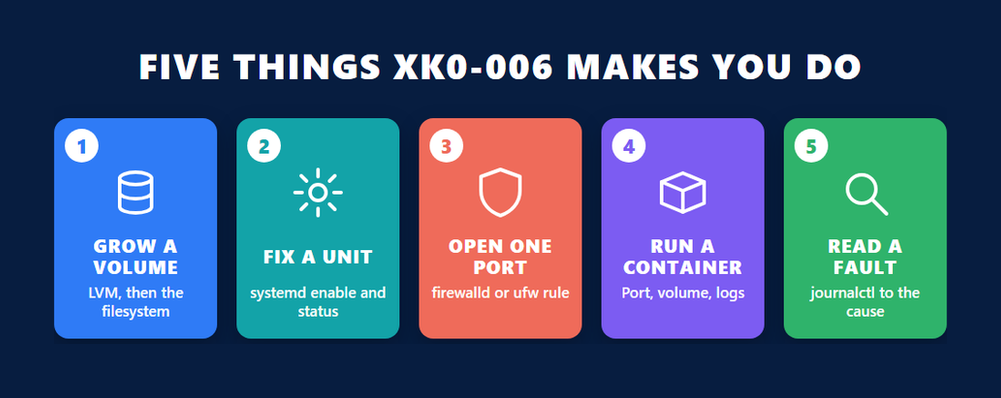
Eighteen of the 29 XK0-006 objectives begin with “Given a scenario”. The others begin with “Explain” or “Summarize”, which signal recall. That split is the most useful planning tool you have. Below is what each domain’s scenario objectives could reasonably make you do, drawn from the commands and files the syllabus names. Before you read on, open the XK0-006 sample questions in another tab: questions seven, eight and ten there are scenario items with command output, and they show how the same objectives look when they are reduced to four options.
System Management
Extend a logical volume and grow the filesystem on it with the right pair of commands for ext4 or XFS. Add a persistent mount to /etc/fstab with nofail so a missing disk does not stop the boot. Bring up an interface with nmcli or a Netplan file. Build a compressed archive of /etc with tar and restore one file from it. Load a kernel module and confirm it with lsmod.
Services and User Management
Create a user with a specific UID and group membership, set a password expiry with chage, and lock the account. Write or edit a systemd unit, reload the daemon, enable the service and read its status. Install a package from a third-party repository and verify its GPG signature. Pull a container image, run it with a mapped port and a mounted volume, read its logs and remove it. That last item alone touches six of the container sub-objectives.
Security
Open one port in firewalld permanently and reload, or write the equivalent ufw rules. Give a group sudo rights for one command through a file in /etc/sudoers.d. Set the SELinux context on a web root with semanage and restorecon, and read an audit denial. Harden sshd by disabling root login and password authentication. Set a umask and an ACL with setfacl. Each of these is a two-to-four command task that a simulated terminal can mark.
Automation, Orchestration, and Scripting
Fix a Bash script: a missing shebang, a backtick substitution that should be $(…), an unquoted variable, a test that uses the wrong comparison operator. Order the steps of an Ansible playbook run, or identify which module and inventory entry a task needs. Stage, commit and tag a change in Git. The Python and AI objectives both begin with “Summarize”, so expect them as recall rather than as a coding task.
Troubleshooting
Read a boot that stops at a GRUB prompt and name the fix. Find the process holding a deleted file open with lsof when a full filesystem will not free space. Diagnose a service that will not start from journalctl output and a failed unit. Explain why a host can reach its gateway but not resolve names, and which file to check. Match a performance symptom, high I/O wait or high load average, to the tool that confirms it.
What Changed From XK0-005 to XK0-006?
XK0-006 replaced XK0-005 with five domains instead of four, a 17 percent automation domain that now includes Python basics, Git and responsible AI use, and a lighter troubleshooting share, down from 28 percent to 22. Containers moved out of the automation domain into Services and User Management. The time, the item maximum and the 720 pass mark did not change.
| XK0-005 domain | Weight | XK0-006 domain | Weight |
|---|---|---|---|
| System Management | 32% | System Management | 23% |
| Security | 21% | Services and User Management (new) | 20% |
| Scripting, Containers, and Automation | 19% | Security | 18% |
| Troubleshooting | 28% | Automation, Orchestration, and Scripting | 17% |
| No fifth domain | n/a | Troubleshooting | 22% |
The weights tell part of the story. The objective lists tell the rest. XK0-006 names OpenTofu alongside Ansible and Puppet, Netplan alongside NetworkManager, LUKS2 and WireGuard under cryptography, OpenSCAP and CIS Benchmarks under compliance, and Kubernetes objects such as ConfigMaps, Secrets and Deployments under orchestration. It also adds a short objective on the responsible use of AI for code generation, which asks for best practice rather than tooling: verify output, do not paste without review, keep corporate data out of public models.
For a candidate who prepared on XK0-005 material, the practical consequence is that a third of the automation domain is new ground, and the old nine-point gap between System Management and everything else is gone. CompTIA’s Linux+ page now lists only V8, so there is no choosing between the two versions.
Practise the Command, Then the Choice
The most effective way to use a CompTIA Linux+ practice test is in reverse. Take each scenario question, hide the options, and perform the task on a lab machine before you look at the answers. A four-option item then becomes a check on a skill you have already exercised, which is what a performance-based item scores. Used that way, a practice set rehearses both halves of XK0-006.
Three habits make this work.
- Turn every “which command” question into a “run the command” task. If the question asks which option adds a directory to PATH in .bashrc, write the line, source the file and echo the variable. The sample set’s question two is exactly this.
- Score yourself on outcome, not recognition. A performance-based item does not care whether you recognised systemctl mask; it cares whether the service stays down after a reboot. Check the result, not the command history.
- Time the hands-on tasks. With up to 90 items in 90 minutes, a hands-on item that takes six minutes has borrowed time from five other questions. Most experienced candidates answer the multiple-choice items first and return to the performance-based ones, which the exam interface allows by flagging.
The same approach exposes the recall objectives for what they are. Software licensing, server architectures, SLIs and SLOs, Python data types and PEP 8 all begin with “Explain” or “Summarize”, and no amount of lab time helps with them. Those are the objectives a flashcard pass covers in a day, and the multiple-choice half of a practice set tests them well.
What Does the Linux+ Exam Cost, and What Happens If You Fail?
The XK0-006 exam fee is $399 in the United States, paid as a single exam voucher redeemed at Pearson VUE. A voucher covers one attempt. If you fail, you can book a second attempt immediately, but a third attempt requires a 14-day wait, and CompTIA does not discount or refund a retake. Each sitting costs the full fee again.
The retake terms are worth reading in CompTIA’s own words, because training sites routinely get them wrong. The CompTIA certification retake policy states that no waiting period applies between a first and second attempt, that a third or later attempt must be at least fourteen calendar days after the last one, and that a candidate who has already passed cannot sit the same exam code again without CompTIA’s consent.
“CompTIA does not offer any free re-tests or discounts on retakes.”
CompTIA sells bundles that pair a voucher with a prepaid retake, and the search data on this exam shows that candidates look for them. Whether that is worth it depends on your pass probability, which a timed practice score estimates better than anything else. A candidate scoring consistently above 80 percent on timed sets, and comfortable with the hands-on tasks above, is paying for insurance. A candidate at 65 percent is paying for a second attempt they will probably use.
Two smaller costs are easy to miss. The exam is delivered in English only, so there is no local-language paper to wait for. And the voucher has a validity period, so buying one before you have a lab and a plan starts a clock you did not need to start.
How Do You Renew Linux+ After You Pass?
CompTIA Linux+ is valid for three years and renews through the CompTIA Continuing Education program. The CEU route needs 50 CEUs earned during the three-year cycle plus a $150 CE fee for the period. Passing the newest Linux+ exam, earning a higher-level CompTIA certification or completing a CertMaster CE course renews it with no fee at all.
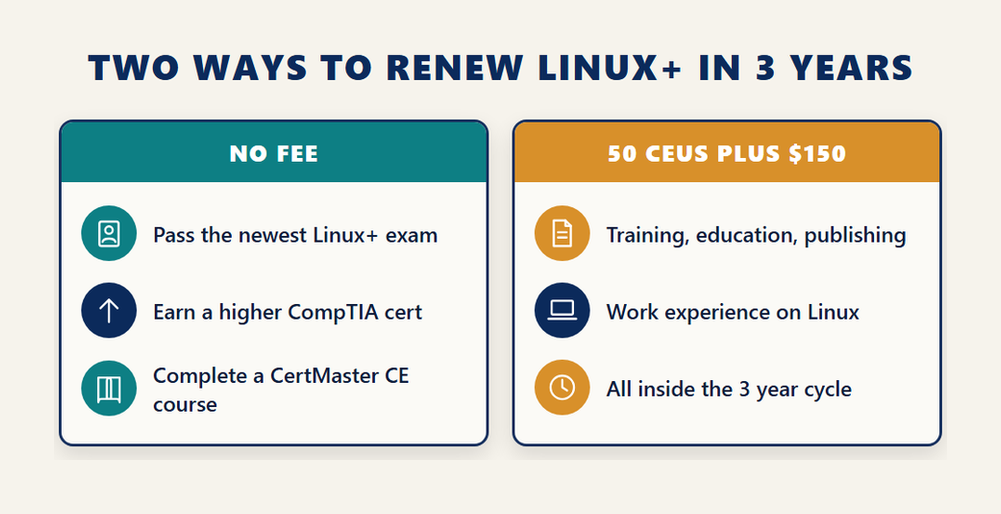
The 50-CEU figure puts Linux+ in CompTIA’s top tier alongside Security+, against 30 for Network+ and 20 for A+. CEUs come from activities that are relevant to the exam objectives, completed inside the cycle and documented: other industry certifications, training and higher education, publishing, work experience and industry participation all count, and at least half of a course’s content has to relate to the Linux+ objectives for it to qualify.
The fee is a three-year total, not an annual charge, and the continuing education renewal fees page says explicitly that you do not have to pay it yearly. It also says that someone holding several CompTIA certifications pays only for the highest-level one, so a Linux+ holder who later earns a higher credential renews Linux+ on that credential’s fee or, if the higher exam fully renews it, on no fee.
One line on CompTIA’s page causes avoidable alarm. It says the XK0-006 version will usually retire about three years after launch, estimated in 2028. That is the life of the exam version, the paper you sit, and not of the certification. A Linux+ earned on XK0-006 stays valid for its three years and renews on the routes above; the 2028 estimate only means that the next version, with a new code, will be the paper new candidates sit after that date.
If you want a domain-by-domain treatment of the objectives themselves before deciding on the CEU route or a higher certification, the earlier Linux+ XK0-006 study guide on this site walks through each of the five domains in turn.
How Should You Build a Lab Before Booking XK0-006?
Build the XK0-006 lab in the order the exam will use it: a virtual machine first, then storage and users, then services and containers, then hardening, then automation, and only then deliberate breakage to practise troubleshooting. Each stage uses the tools the syllabus names, and each stage leaves something the next one needs, which is how a real server is built.
- Install two virtual machines with KVM and QEMU, one RPM-based and one Debian-based, and manage them with virsh so that cloning, snapshots and disk image resizing are things you have done rather than read.
- Add a second disk to each machine and put it under LVM, then practise growing a logical volume and its filesystem, writing the /etc/fstab entry, and building a small RAID array with mdadm.
- Create users and groups with specific UIDs, set expiry and lock policies with chage, and install a web server and a time service from packages, each run as a systemd unit you have enabled, masked and edited.
- Install Podman, pull an image, run it with a mapped port and a named volume, build one image from a Dockerfile, and bring a two-container application up with Compose.
- Harden both machines: firewalld or ufw rules, a sudoers.d file, SSH key-only access with root login disabled, an SELinux context change on the web root, and an OpenSCAP or CIS Benchmark scan to read the findings.
- Automate what you just did with a short Ansible playbook under Git, then break each machine on purpose, a bad fstab line, a masked service, a wrong SELinux context, a firewall rule that blocks DNS, and fix it from the symptoms alone.
Step four is where most candidates spend the least time and lose the most marks, because container operations are now a Services and User Management objective rather than an automation footnote. The Open Container Initiative overview explains why runC, Podman, containerd and Docker appear together in the syllabus: they share the same image and runtime specifications, so an image built with one runs under another, and the exam treats them as one skill.
Step six needs the least equipment and the most discipline. The Ansible getting started guide walks through an inventory, an ad hoc command and a first playbook in an afternoon, which covers the agentless, inventory, modules and playbook terms the objective names. If automation is where you want to go after Linux+, the CompTIA AutoOps+ automation exam builds on exactly this domain and is the natural next CompTIA step for a Linux administrator.
How long the plan takes depends on where you start. Someone already meeting CompTIA’s recommended 12 months of server experience usually needs the lab for the gaps, containers, Git and the new compliance tools, rather than for the whole syllabus. Someone short of that experience should treat the lab as the experience, and budget accordingly.
Frequently Asked Questions
How many questions are on the CompTIA Linux+ XK0-006 exam?
XK0-006 has a maximum of 90 items in 90 minutes, mixing multiple-choice questions with performance-based items. CompTIA states the count as a maximum rather than a fixed number because hands-on items take longer and the paper is balanced for time. The passing score is 720 on a 100 to 900 scale.
Does a CompTIA Linux+ practice test include performance-based questions?
Most practice sets, including the EduSum XK0-006 sample set, use multiple-choice and select-two items, some with command output. They cannot run a terminal. The way round that is to perform each scenario question on a lab machine before reading the options, so the practice test checks a skill you have exercised.
How much does the Linux+ XK0-006 exam cost?
The XK0-006 exam fee is $399 in the United States, paid as a Pearson VUE voucher that covers one attempt. CompTIA’s own page does not display a price, so the figure comes from the exam listing. Retakes cost the full fee again; CompTIA offers no discount or free retest.
What is the retake policy if I fail XK0-006?
CompTIA requires no waiting period between a first and a second attempt. A third or any later attempt must be at least 14 calendar days after the last one. Someone who has already passed cannot sit the same exam code again without CompTIA’s consent. Every attempt is paid in full.
What changed between XK0-005 and XK0-006?
XK0-006 has five domains instead of four. A new Services and User Management domain holds accounts, systemd and containers at 20 percent, automation now includes Python basics, Git and responsible AI use at 17 percent, and Troubleshooting fell from 28 percent to 22. Time, item maximum and the 720 pass mark are unchanged.
How long is CompTIA Linux+ valid, and how do I renew it?
Linux+ is valid for three years. It renews with 50 CEUs earned during the cycle plus a $150 fee for the period, or at no fee by passing the newest Linux+ exam, earning a higher-level CompTIA certification or completing a CertMaster CE course. The CE fee is a three-year total, not an annual charge.
Does Linux+ retire in 2028?
No. CompTIA estimates that the XK0-006 exam version will be replaced around 2028, roughly three years after its July 2025 launch. That is the life of the paper, not the credential. A Linux+ earned on XK0-006 remains valid for its three years and renews through continuing education like any other CompTIA certification.
What experience does CompTIA recommend before XK0-006?
CompTIA recommends 12 months of hands-on experience with Linux servers, with A+, Network+ or Server+ or comparable knowledge behind it. None of these is a formal prerequisite; you can book XK0-006 without them. The recommendation describes the level the scenario items assume rather than a gate.
Is Linux+ a good first Linux certification compared with other vendors’ exams?
Linux+ is vendor-neutral and distribution-neutral, covering both RPM-based and Debian-based systems in one exam, and it carries ISO accreditation through the ANSI National Accreditation Board. For a candidate who already holds or plans other CompTIA credentials, it also shares their continuing education program, so one renewal path covers several certifications.
Conclusion
XK0-006 is two exams in one sitting: a recall paper that a good practice set prepares you for completely, and a hands-on paper that only a lab can. Eighteen scenario objectives across storage, accounts, services, containers, firewalls, SELinux, scripting and fault-finding are where the performance-based items live, and each one reduces to a short command task you can rehearse on a virtual machine this week. The money side is simple once the policy is read correctly: $399 a sitting, no wait before a second attempt, 14 days before a third, and a credential that lasts three years and renews on CEUs or a higher exam. Build the lab in the order above, run every scenario question as a task before you score it, and the four-option half will take care of itself. Start with the sample questions, hide the answers, and open a terminal.