A Core 2 study guide written for 220-1102 has no chapter on artificial intelligence, no entry for Zero Trust and no mention of Windows 11, because none of those appeared in the old objectives. All three are on 220-1202, the Core 2 exam in CompTIA’s V15 A+ series, along with roughly two dozen other topics that older notes simply do not cover.
The headline numbers barely moved. Core 2 is still up to 90 questions in 90 minutes, and the pass mark is still 700 on a 900 point scale. What changed is the balance of the paper and the detail underneath it: security climbed from 25 to 28 percent and now ties operating systems for the largest share, while the objectives added modern threats, detection tools and a short block on AI policy. This guide maps exactly what was added, so you can tell which parts of older material still hold and which parts you need to learn fresh.
What Changed Between 220-1102 and 220-1202?
The four Core 2 domains kept their names, but their weights shifted. Security rose from 25 to 28 percent and software troubleshooting from 22 to 23, while operating systems fell from 31 to 28 and operational procedures from 22 to 21. Underneath those weights, the 220-1202 objectives add Windows 11, AI concepts, Zero Trust and newer threat types.
| Domain | 220-1102 weight | 220-1202 weight | Change |
|---|---|---|---|
| Operating Systems | 31% | 28% | Down 3 points |
| Security | 25% | 28% | Up 3 points |
| Software Troubleshooting | 22% | 23% | Up 1 point |
| Operational Procedures | 22% | 21% | Down 1 point |
Three points sounds small, but on a 90 question paper it is roughly three questions moving out of operating systems and into security. Put another way, operating systems and security now carry 56 percent of Core 2 between them in equal halves, where the old exam leaned clearly towards operating systems.
The weights tell only half the story. The bigger change is in the wording of the objectives themselves. The old operating systems objectives were written around Windows 10 by name; the new ones talk about Microsoft Windows in general and add a full set of Windows 11 editions. The security domain gained modern identity concepts and a family of detection tools. Operational procedures gained a short objective on artificial intelligence. None of that shows up in a weights table, which is why a list of what was added is more useful than a list of percentages.
What the 220-1202 Exam Looks Like
220-1202 is CompTIA A+ Core 2 in the V15 series. It allows up to 90 questions in 90 minutes, needs 700 on a 900 point scale to pass, costs 274 US dollars and is booked through Pearson VUE. CompTIA recommends 12 months of hands-on IT support experience and offers it in English, German and Japanese.
| Field | 220-1202 detail |
|---|---|
| Exam | CompTIA A+ Core 2, V15 series |
| Exam code | 220-1202 |
| Questions | Up to 90: multiple choice (single and multiple response), drag and drop, and performance-based |
| Duration | 90 minutes |
| Passing score | 700 on a scale of 900 |
| Price | 274 US dollars |
| Delivery | Pearson VUE |
| Languages | English, German and Japanese |
| Recommended experience | 12 months hands-on in an IT support specialist role |
| Launch and retirement | Launched 25 March 2025; retirement estimated 2028 |
These figures are the ones CompTIA publishes on its A+ Core 2 page, which also lists three DoD 8140 work roles the credential is approved for: technical support specialist, system administrator, and cyber defense infrastructure support specialist.
Two details matter more than they look. First, the pass mark is 700, which is higher than the 675 needed on Core 1, so Core 2 is the stricter of the two papers even though the timing is identical. Second, the score is scaled, so 700 of 900 is not the same as answering 78 percent of questions correctly, and the question count itself can come in below 90. Plan on mastery of the objectives rather than on a target number of mistakes you can afford.
Which Topics Are New in the Core 2 Objectives?
Compared line by line with the 220-1102 objectives, 220-1202 adds Windows 11 editions, the ReFS and XFS file systems, an objective on AI concepts, Zero Trust, just-in-time access, SAML, EDR, MDR and XDR, stalkerware and fileless malware, QR code phishing, smishing, business email compromise, supply chain attacks, cloud productivity tools, and the SPICE and WinRM remote access methods.
That is a long list, so it helps to sort it by domain. Every item below appears in the current objectives and not in the previous set.
Operating Systems additions
- Windows 11 Home, Pro and Enterprise, alongside the Windows 10 editions that remain
- Resilient File System (ReFS) and Extended filesystem (XFS) in the file system list
- Zero-touch deployment as an installation type
- macOS Rapid Security Response and Continuity
- Linux package management with dnf, network tools such as traceroute and curl, the /etc/fstab file and systemd
- The whoami command among the Windows informational tools
- A new objective on installing and configuring cloud-based productivity tools, including identity synchronization and licensing assignment
Security additions
- Zero Trust model, just-in-time access, privileged access management, SAML, data loss prevention and identity access management
- Endpoint, managed and extended detection and response (EDR, MDR, XDR)
- Stalkerware and fileless malware
- QR code phishing, smishing, business email compromise and supply chain attacks
- Mobile digital keys and facial recognition technology as physical access methods
- Passwordless sign-in and BitLocker-To-Go in the Windows security settings, and Secure DNS in the browser settings
Operational Procedures additions
- A full objective on basic AI concepts
- SPICE and WinRM in the remote access list
- Configuration management database (CMDB) in asset management
- Change freeze in change management, and order of volatility in incident response
If you are working from material written for the old exam, these are the gaps to fill. The rest of the old content is largely still valid, because most objectives carried over with the same wording. The complete 220-1202 objectives list on EduSum shows every sub-topic under each heading if you want to tick them off one by one.
Why Does Security Now Carry 28 Percent?
Security grew because help desk work increasingly is security work. The 220-1202 security domain asks a support technician to recognise threats, apply Windows and mobile hardening, configure wireless and router security, and understand identity concepts such as Zero Trust and multifactor authentication. It is defensive, entry-level knowledge, not penetration testing.
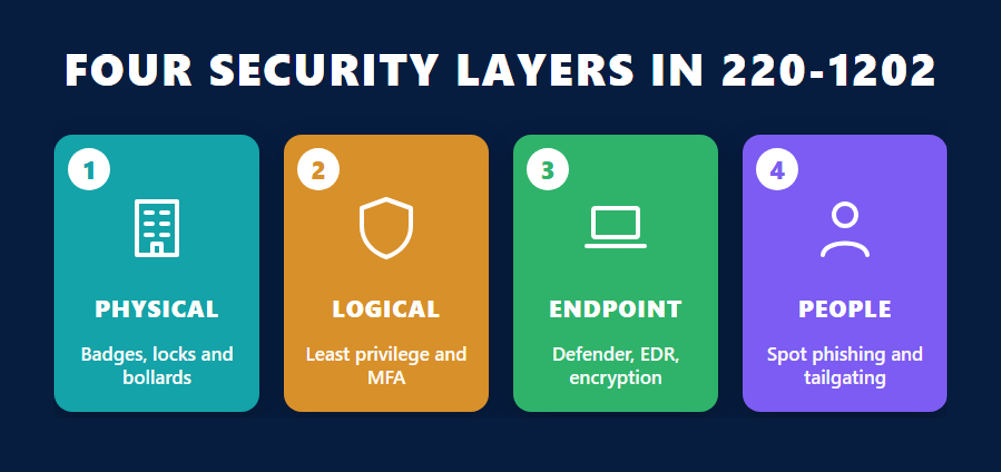
The domain has eleven objectives, and they fall into four layers that are worth studying in order.
Physical and logical controls
The first objective covers physical security, from bollards and access control vestibules to badge readers and biometrics, then logical security: least privilege, access control lists, multifactor authentication methods such as authenticator apps and time-based one-time passwords, single sign-on and directory services. Zero Trust is the conceptual umbrella for much of this, and NIST’s Zero Trust Architecture publication is the clearest primary description of what the term means. For A+ you need the idea, not the architecture: never trust a request simply because it comes from inside the network.
Windows, mobile and network hardening
This is the hands-on core of the domain. Expect scenario questions on Defender Antivirus and the Windows firewall, standard versus administrator accounts, NTFS versus share permissions, User Account Control, BitLocker and Active Directory tasks such as joining a domain or applying Group Policy. Mobile hardening covers screen locks, patching, remote wipe and MDM. The small office router objective covers changing default passwords, firmware updates, guest wireless and disabling unused ports.
Threats and how they are spotted
The malware objective lists the types you must recognise, from Trojans and rootkits to ransomware, keyloggers, stalkerware and fileless malware, and the tools used against them, including EDR, MDR and XDR. The social engineering objective covers phishing in all its forms plus threats such as on-path attacks, brute force, insider threats, SQL injection and cross-site scripting. At this level you identify the attack and the defence. The OWASP Top Ten project is a reliable place to read plain descriptions of the web application risks, such as injection, that the objective names.
The malware removal sequence
One objective is a fixed procedure, and it is examined as an order: investigate and verify symptoms, quarantine the system, disable System Restore in Windows Home, remediate, update anti-malware, scan and remove, reimage if needed, schedule scans, re-enable System Restore with a new restore point, and educate the user. Learn it as a sequence, because drag and drop items test exactly that.
How Much of the Operating Systems Domain Is Windows?
Most of it. Of the eleven operating systems objectives on 220-1202, five are about Windows: editions, tools, command-line utilities, settings and networking. macOS and Linux get one objective each, and the rest cover OS types, installations, application requirements and cloud productivity tools. Windows depth is still the deciding factor in this 28 percent domain.
The Windows editions objective now spans both Windows 10 and Windows 11, and it asks about the differences that matter in a support role: domain versus workgroup, Remote Desktop availability, RAM limits, BitLocker and the Group Policy editor. It also names TPM and UEFI as hardware requirements, which is the practical reason some older PCs cannot move to Windows 11. Microsoft’s Windows 11 specifications page lists those requirements directly.
The command-line objective is pure recall and worth memorising early. It groups commands by purpose:
- Navigation: cd and dir
- Network: ipconfig, ping, netstat, nslookup, net use, tracert and pathping
- Disk: chkdsk, format and diskpart
- Files: md, rmdir and robocopy
- Information: hostname, net user, winver and whoami
- OS management: gpupdate, gpresult and sfc
On the other platforms, the macOS objective covers application formats (.dmg, .pkg, .app), system folders, Time Machine, Keychain, FileVault and Continuity. The Linux objective covers file and permission commands such as chmod and chown, package management with apt and dnf, common configuration files such as /etc/passwd and /etc/hosts, and the root account. Neither is deep, but both reliably produce a few questions each.
What Does Core 2 Expect You to Know About AI?
Core 2 treats AI as a workplace policy topic, not a technical one. The objective, under operational procedures, asks you to explain application integration, appropriate use and plagiarism, the limitations of bias, hallucinations and accuracy, and the difference between private and public AI in terms of data security, data source and data privacy.
Read that list as the questions a help desk will actually be asked. A user wants to paste a customer spreadsheet into a public chatbot: the objective expects you to recognise that as a data privacy problem, because the objective separates public and private AI precisely on data security, data source and data privacy. A manager wants to use generated text in a report: that raises appropriate use and plagiarism. A user trusts an answer that turns out to be invented: that is a hallucination, and the reason output needs checking.
None of this needs any knowledge of how models are built. It needs clear definitions and the judgement to connect each limitation to a realistic support scenario, which is exactly how the rest of the operational procedures domain is examined.
Is Software Troubleshooting Now Mostly About Security Symptoms?
About half of it is. The 23 percent software troubleshooting domain has four objectives: common Windows issues, mobile OS and application issues, mobile security issues, and PC security issues. The last two ask you to read symptoms such as fake security warnings, high network traffic, certificate warnings or browser redirection and recognise a likely compromise.
The Windows objective lists the symptoms you should be able to diagnose from a description: blue screen errors, degraded performance, boot issues, frequent shutdowns, services that will not start, crashing applications, low memory warnings, USB controller resource warnings, a missing OS, slow profile loads and time drift. The mobile objective covers apps that fail to launch, close, update or install, battery life, random reboots, connectivity across Bluetooth, Wi-Fi and NFC, and a screen that will not autorotate.
The security half is where the domain overlaps with the security domain. Mobile security issues start from causes such as unofficial app stores, developer mode and application spoofing, then list symptoms like unexpected data usage, a flood of ads and leaked personal files. PC security issues include desktop alerts, false antivirus warnings, altered or missing files, failed OS updates and browser pop-ups. The skill being tested is the same in both: notice the symptom, name the likely cause, choose the right next step. Our existing Core 2 study guide pairs each domain with suggested resources if you want a second view of the material.
Operational Procedures: More Than Safety Straps
Operational procedures is 21 percent of 220-1202 and covers how support work is run: ticketing and documentation, asset management, change management, backup and recovery, safety and environmental controls, incident response and licensing, professional communication, scripting basics, remote access technologies and AI concepts. It rewards structured thinking more than memorisation.
Tickets, assets and change
The documentation objective covers what a good ticket holds: user and device information, a clear issue description, category, severity and escalation level, then progress notes and resolution. Asset management now names the configuration management database alongside inventory lists and asset tags. Change management covers request forms, scope, risk analysis, standard, normal and emergency change types, change freezes, maintenance windows, rollback plans and change board approval.
Backup and recovery
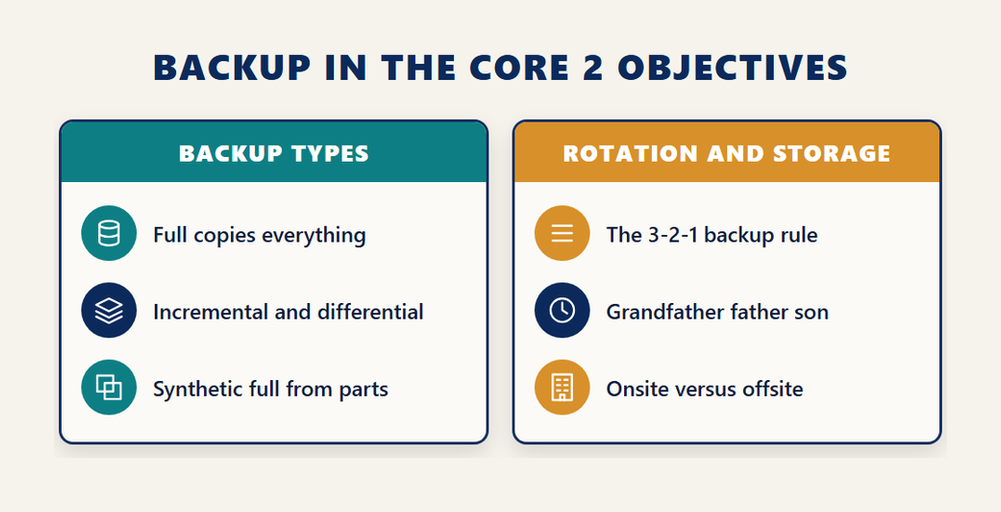
You need to distinguish full, incremental, differential and synthetic full backups, in-place and alternative-location recovery, and two rotation schemes: grandfather-father-son and the 3-2-1 rule. Backup testing frequency and onsite versus offsite storage complete the objective.
Scripting and remote access
The scripting objective asks you to recognise file types (.bat, .ps1, .vbs, .sh, .js and .py), common uses such as remapping drives or automating backups, and the risks of running scripts carelessly. Remote access covers RDP, VPN, VNC, SSH, RMM, SPICE and WinRM, plus the security considerations of each method.
The remaining objectives, on safety, environment, incident response and professionalism, are the most predictable on the paper. Chain of custody, order of volatility, ESD straps, battery and toner disposal and dealing calmly with a difficult customer are all straightforward once read carefully.
Can You Pair an Old Core 1 Pass With 220-1202?
No. CompTIA states that Core 1 and Core 2 must be taken from the same exam version, with no mixing allowed. A candidate who passed 220-1101 cannot complete A+ by passing 220-1202. Earning the credential in the V15 series means passing both 220-1201 and 220-1202.
This catches people who started A+ on the previous series and paused. If that is you, plan for both V15 exams rather than one. The order is your choice, since CompTIA lets you take the two cores in either sequence, but the pair has to match.
For someone starting fresh, the question is only which to sit first. Core 2 has the higher pass mark at 700 against 675, and much of it builds on ideas from Core 1, such as networking basics behind the Windows networking and router security objectives. That makes Core 1 a sensible first exam for most people, though there is no rule requiring it. If you have not yet looked at the other half, our breakdown of the Core 1 exam domains covers its weights and scoring.
How Should You Study the Core 2 Objectives?
Start from the official objectives, not from a book chapter list, and work the two 28 percent domains first. Build hands-on time on Windows, then add macOS and Linux basics, then the procedural material. Finish with timed, mixed-format practice that includes drag and drop and performance-based items.
- Download or print the 220-1202 objectives and mark every item you cannot explain in a sentence.
- Work through the Windows objectives on a real or virtual machine, running each listed command and opening each listed tool yourself.
- Study the security domain layer by layer, and learn the malware removal steps as a fixed sequence.
- Spend shorter sessions on macOS, Linux and cloud productivity tools, focusing on the named commands, files and features.
- Read the operational procedures and AI objectives, and connect each item to a realistic help desk scenario.
- Revisit every item you marked in step 1, then sit timed mixed-format practice and review each wrong answer against the objective it came from.
If your materials predate the V15 series, use the list of additions earlier in this guide as a checklist. Fill those gaps first, because they are the topics an older book is guaranteed to miss.
Frequently Asked Questions
What is the passing score for CompTIA A+ Core 2?
220-1202 requires 700 on a scale of 900. That is higher than the 675 needed for Core 1, and the score is scaled, so it does not convert directly into a percentage of correct answers.
How many questions are on the 220-1202 exam?
CompTIA publishes a maximum of 90 questions, mixing multiple choice, drag and drop and performance-based items, with 90 minutes to complete them.
What are the four Core 2 domains and their weights?
Operating Systems 28 percent, Security 28 percent, Software Troubleshooting 23 percent and Operational Procedures 21 percent.
What is new in 220-1202 compared with 220-1102?
Security rose from 25 to 28 percent and operating systems fell from 31 to 28. New objectives and topics include Windows 11 editions, AI concepts, Zero Trust, EDR, MDR and XDR, newer phishing types, cloud productivity tools and the SPICE and WinRM remote access methods.
Is AI on the CompTIA A+ Core 2 exam?
Yes. One objective in operational procedures covers basic AI concepts: application integration, appropriate use and plagiarism, bias, hallucinations and accuracy, and private versus public AI in terms of data security and privacy.
Can I combine a 220-1101 pass with 220-1202?
No. CompTIA requires both cores to come from the same version, so completing A+ in the V15 series means passing 220-1201 and 220-1202.
How much does the 220-1202 exam cost?
The exam price is 274 US dollars, and it is scheduled through Pearson VUE.
What experience does CompTIA recommend before Core 2?
CompTIA recommends 12 months of hands-on experience in an IT support specialist role, though it is a recommendation rather than an eligibility requirement.
When will 220-1202 retire?
The V15 series launched on 25 March 2025, and CompTIA estimates retirement in 2028, in line with its usual pattern of retiring exams about three years after launch.
Conclusion
220-1202 looks like its predecessor from a distance: four domains, up to 90 questions, 90 minutes and a 700 pass mark. Up close it is a different exam. Security now ties operating systems at 28 percent, Windows 11 sits beside Windows 10, and the objectives add Zero Trust, detection and response tools, newer phishing types, cloud productivity tools and a short but real objective on AI. Older study material still covers most of the paper, but not those additions, and they are exactly the questions a well-prepared candidate on old notes will miss. Work the two largest domains first, practise on real systems, and use the list of new topics as your checklist. Then book Core 2 knowing it matches the V15 Core 1 you pass alongside it.