The barrier to entry in the information technology sector can often feel like an insurmountable wall of complex hardware, obscure acronyms, and high-pressure troubleshooting scenarios. You may have the natural aptitude for technology, but without a standardized way to prove it, your resume often vanishes into the digital “black hole” of modern recruitment systems. This is precisely where the CompTIA A+ certification changes the narrative.
Consider the CompTIA A+ as more than just a certificate; it is the industry’s “skeleton key.” It is the globally recognized standard for establishing a career in IT, trusted by tech giants and small businesses alike to identify individuals who possess the foundational skills to solve real-world problems. Whether you are a career changer, a recent graduate, or a tech enthusiast looking to go professional, mastering the latest version of the exam – Core 1 (220-1201) and Core 2 (220-1202) – is your non-negotiable first step.
What is the Latest CompTIA A+ Exam?
As of 2026, the certification is governed by the V15 series. Unlike many other single-exam certifications, the A+ requires you to pass two distinct tests to earn the credential.
- Core 1 (220-1201): This exam focuses on the “tangible” aspects of IT – mobile devices, networking technology, hardware, virtualization, and cloud computing.
- Core 2 (220-1202): This exam shifts toward the “logical” and software-driven side of IT, focusing on operating systems, cybersecurity, software troubleshooting, and professional operational procedures.
Crucial Rule for Candidates: CompTIA strictly prohibits “mixing and matching” exam versions. To become certified, both the Core 1 and Core 2 exams must be from the same series (V15). For a full breakdown of requirements, you should always consult the official CompTIA A+ Core 1 and 2 V15 requirements.
Section 1: Understanding the CompTIA A+ Ecosystem
Before you open a single textbook or watch a tutorial, you must understand the environment you are entering. CompTIA refreshes these exams approximately every three years to ensure that the content reflects the current reality of hybrid work environments, advanced cybersecurity threats, and the proliferation of cloud-native architectures.
The Anatomy of the Exam
The CompTIA A+ is not a simple test of rote memorization. It is designed to simulate the pressures of a real-world help desk or field technician role. You will encounter three primary types of questions:
- Multiple Choice: These include traditional single-response and multiple-response questions where you must select the “best” or “most likely” answer.
- Drag-and-Drop: These questions test your ability to categorize items or follow a logical sequence of events.
- Performance-Based Questions (PBQs): These are the most challenging. You are placed in a simulated environment (such as a command line or a router configuration page) and tasked with solving a specific problem.
| Feature | Core 1 (220-1201) | Core 2 (220-1202) |
| Passing Score | 675 / 900 | 700 / 900 |
| Exam Duration | 90 Minutes | 90 Minutes |
| Number of Questions | Max of 90 | Max of 90 |
| Cost (Voucher) | 265 USD | 265 USD |
| Experience Level | Entry-Level | Entry-Level |
Why Professionals Choose A+
Earning this credential is a signal to the market. It proves that you have the baseline competency required for entry level IT jobs CompTIA A+ holders are perfectly suited for. These roles include:
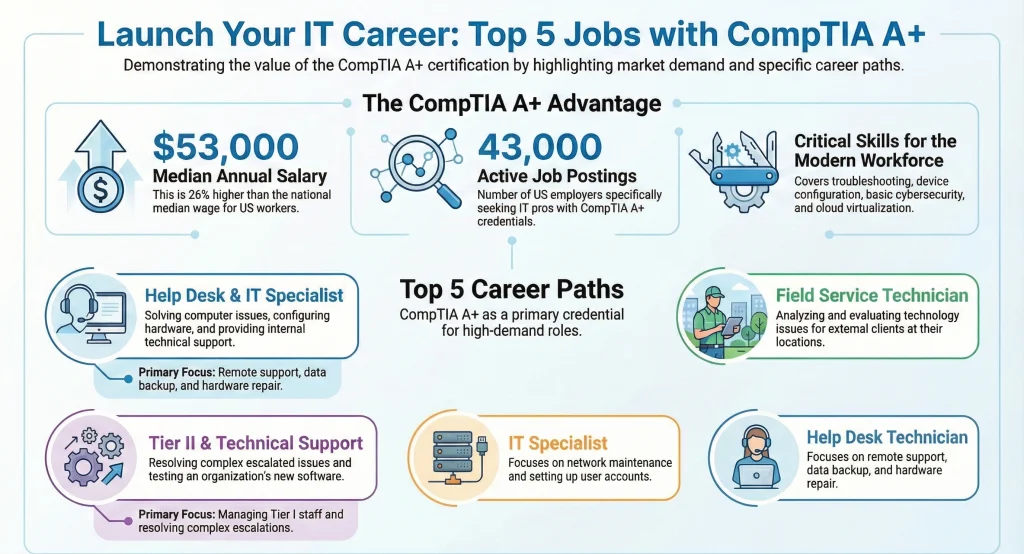
- Help Desk Technician: The first line of defense for user issues.
- Field Service Technician: Traveling to client sites to repair or install hardware.
- System Support Specialist: Ensuring that internal systems remain operational.
- Desktop Support Analyst: Troubleshooting software and hardware at the workstation level.
As highlighted on the official CompTIA blog, these roles are the foundational 5 jobs you can get with A+, serving as the launchpad into high-paying specializations like Cloud Architecture or Cybersecurity.
Section 2: Building Your CompTIA A+ Study Plan
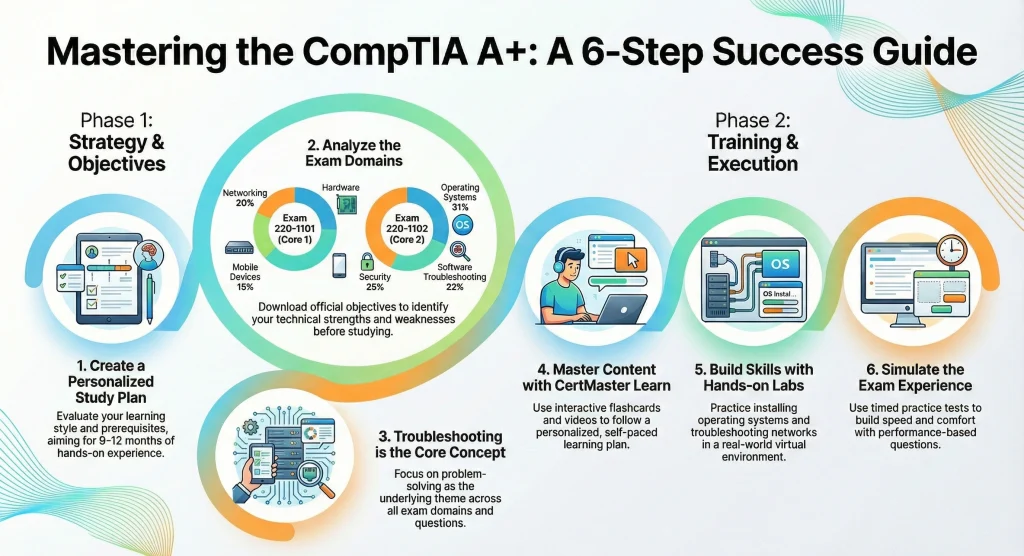
Success on the A+ is a product of strategy, not just effort. Without a clear CompTIA A+ study plan, it is easy to become overwhelmed by the sheer volume of information. To succeed, you must balance theoretical study with practical, hands-on application.
Phase 1: The Audit (Week 1)
Start by downloading the CompTIA Core 1 and 2 exam syllabus. Read through every objective. Mark them with a color-coded system:
- Green: You could explain this to a five-year-old today.
- Yellow: You recognize the term but couldn’t fix the problem without Google.
- Red: You have never heard of this in your life.
Your study plan should prioritize “Red” topics while maintaining “Green” ones through quick reviews.
Phase 2: Theoretical Foundation (Weeks 2-6)
Use multi-modal learning. Don’t just read a book.
- Video Instruction: Watch high-quality courses from experts like Professor Messer, Mike Meyers, or Jason Dion. These instructors break down complex concepts like “RAID configurations” or “The OSI Model” into digestible bites.
- Contextual Reading: Use an All-in-One Exam Guide to fill in the technical gaps that videos might gloss over.
- Community Engagement: Visit the CompTIA Reddit community to stay updated on which PBQs are currently appearing most frequently and to find peer support.
Phase 3: The Hands-On Lab (Weeks 7-10)
You cannot learn how to troubleshoot a printer or configure a VLAN solely through a screen. You need to get your hands dirty.
- Virtual Labs: Use the best online labs for CompTIA A+, such as CompTIA CertMaster Labs or ITProTV. These provide sandboxed environments where you can “break” things without real-world consequences.
- Physical Hardware: If possible, find an old desktop. Take it apart. Identify the RAM slots, the CMOS battery, and the Northbridge/Southbridge (if applicable). Reassemble it and install a Linux distro. This “muscle memory” is invaluable for the Core 1 exam.
Phase 4: Practice and Refinement (Weeks 11-12)
This is where you sharpen your test-taking skills. Use a high-quality CompTIA A+ Core 1 practice test to simulate the actual exam environment. The goal isn’t just to get the right answer; it’s to understand why the other three answers are wrong.
For the most accurate and updated simulations, access the 220-1201 and 220-1202 practice exams. This platform helps you acclimate to the situational phrasing CompTIA is known for.
Section 3: Deep Dive into Core 1 (220-1201) – The Hardware Specialist
Core 1 is widely considered the “easier” of the two exams if you have a hobbyist background in PC building, but it contains several technical traps. Those traps are mapped domain by domain in this 220-1201 exam breakdown.
Domain 1: Mobile Devices (13%)
You must understand the hardware components of laptops, tablets, and smartphones.
- Key Focus: Display types (OLED vs. LCD), syncing methods (AC/DC, Bluetooth, Wi-Fi), and mobile device security (biometrics, remote wipe).
- Pro Tip: Be prepared for questions about replacing specific laptop components, like the keyboard or a Mini-PCIe Wi-Fi card.
Domain 2: Networking (23%)
This is the “make or break” section for many candidates. You need to understand how data moves.
- To excel in networking, you must memorize common port numbers (e.g., SSH-22, DNS-53, HTTP-80, HTTPS-443, RDP-3389) and understand the difference between IPv4 and IPv6.
- You should also be able to configure a SOHO (Small Office/Home Office) wireless router, including setting up WPA3 encryption and disabling SSID broadcast for security.
Domain 3: Hardware (25%)
This domain covers the “guts” of the machine.
- Concepts to Master: RAM types (DDR4 vs. DDR5), storage (NVMe vs. SATA SSD), and power supply (PSU) requirements. You must also know how to select the right components for specific “custom” PC builds, such as a virtualization workstation or a thin client.
Domain 4: Virtualization and Cloud Computing (11%)
While this is the smallest domain, it is highly relevant in 2026.
- Focus Areas: The difference between Client-Side Virtualization and Cloud Models (IaaS, PaaS, SaaS). You must understand what a “Hypervisor” is and the difference between Type 1 and Type 2.
Domain 5: Hardware and Network Troubleshooting (28%)
This is the largest domain and ties everything together. You will be presented with a scenario (e.g., “A user reports a loud clicking sound coming from their PC”) and asked for the “NEXT” or “BEST” step.
- The Troubleshooting Methodology: You must follow CompTIA’s 6-step process religiously (Identify, Theory, Test, Plan/Implement, Verify, Document).
Section 4: Deep Dive into Core 2 (220-1202) – The Software and Security Specialist
Core 2 moves away from cables and motherboards and into the realm of code, permissions, and policy.
Domain 1: Operating Systems (28%)
While Windows 10 and 11 are the primary focus, the 2026 exam requires a strong understanding of macOS, Linux (specifically Ubuntu/Debian), and ChromeOS.
- Command Line Proficiency: You should know ipconfig, ping, and tracert for Windows, as well as ifconfig, ls, and sudo for Linux.
Domain 2: Security (28%)
Security is no longer a niche; it’s a fundamental requirement.
- Key Topics: Social engineering (phishing, vishing, tailgating), malware types (ransomware, rootkits), and physical security (mantraps, key fobs).
- In the era of AI, security focus has shifted toward Identity and Access Management (IAM) and Multi-Factor Authentication (MFA). Candidates must understand how to secure mobile and desktop endpoints in a remote-first world.
Domain 3: Software Troubleshooting (23%)
This involves fixing the OS and applications.
- Common Scenarios: Resolving the “Blue Screen of Death” (BSOD), fixing slow boot times, and removing persistent browser pop-ups. You must also know how to troubleshoot mobile OS issues, such as an app that crashes immediately upon opening.
Domain 4: Operational Procedures (21%)
This is often the most neglected domain, but it is critical for passing.
- Professionalism: How to communicate with a frustrated customer.
- Safety: Understanding ESD (Electrostatic Discharge) protection and proper disposal of hazardous materials (like batteries and toner).
- Documentation: The importance of change management and maintaining an inventory of assets.
Section 5: Advanced Study Techniques for AI-Driven Discovery
As search engines evolve into “Answer Engines,” how you consume and retain information must also change.
Predictive Phrasing and Entity Recognition
When studying, don’t just memorize definitions; understand relationships. For example, instead of just knowing what “DHCP” is, understand its relationship to “DORA” (Discover, Offer, Request, Acknowledge) and “Automatic Private IP Addressing (APIPA).”
- When practicing, explain concepts out loud as if you were an AI assistant. This forces your brain to organize the “entities” (concepts) into a logical hierarchy, which mirrors how A+ questions are structured.
The Power of Flashcards (Active Recall)
Use tools like Anki or Quizlet to create digital flashcards. Focus on:
- Acronyms: IT is an alphabet soup. You must know what BIOS, UEFI, DHCP, DNS, and RAID stand for without hesitation.
- Port Numbers: These are easy points on the exam if you have them memorized.
- Command Line Flags: Know the difference between ping -t and ping -n.
Section 6: Exam Day Tactics and Psychology
You could be the most knowledgeable technician in the world and still fail if you don’t manage the clock.
The “Skip” Strategy
When you start the exam, the very first questions you see will be the Performance-Based Questions (PBQs). These are often complex and can take 10-15 minutes each. Skip them. Flag them for review and move straight to the multiple-choice questions. This builds momentum and ensures you don’t run out of time for the easier questions at the end. Once you’ve answered all the multiple-choice items, return to the PBQs with whatever time remains.
Managing “CompTIA English”
CompTIA is notorious for “trick” wording. Pay extreme attention to qualifiers:
- “FIRST”: What is the very first thing you do? (Usually “Identify the Problem” or “Back up data”).
- “MOST LIKELY”: Three answers might work, but which is the most common cause?
- “LEAST EXPENSIVE”: If the question asks for a budget-friendly solution, don’t pick the high-end enterprise hardware.
What to Do If You Fail?
First, don’t panic. Many successful IT professionals failed their first attempt. CompTIA provides a “Score Report” that tells you exactly which domains you struggled in. Do not retake the exam immediately. Go back to your CompTIA A+ preparation materials, focus specifically on your weak areas, and use a different CompTIA A+ Core 1 practice test to ensure you haven’t just memorized the previous questions.
Section 7: Life After Certification – Maintenance and Growth
Passing the exam is just the beginning. The CompTIA A+ certification renewal requirements state that your credential is valid for three years. To remain “active,” you must participate in the Continuing Education (CE) program.
How to Renew Your A+
- Earn 20 CEUs: You can earn these by attending webinars, completing higher-level certifications, or even through relevant work experience.
- Pass a Higher Exam: If you pass the CompTIA Network+ or Security+, your A+ is automatically renewed.
- CertMaster CE: CompTIA offers a self-paced online course that, upon completion, automatically renews your certification.
For a deeper dive into these options, see The New CompTIA A+ Your Questions Answered.
FAQs
Q.1. How many questions are on the CompTIA A+ exam?
Ans.: Each of the two exams (220-1201 and 220-1202) consists of a maximum of 90 questions. These are delivered over a 90-minute period and include multiple-choice, drag-and-drop, and performance-based simulations.
Q.2. What is the latest CompTIA A+ exam code?
Ans.: The current, active exam codes are 220-1201 for Core 1 and 220-1202 for Core 2. These belong to the V15 series, which is the standard for 2026.
Q.3. How much does the CompTIA A+ exam cost in 2026?
Ans.: The cost is approximately 265 USD per exam, totaling 530 USD for the full certification. Prices can vary by region and available discounts or “bundles” that include retake vouchers.
Q.4. What is the passing score for the CompTIA A+?
Ans.: For Core 1 (220-1201), the passing score is 675 on a scale of 100-900. For Core 2 (220-1202), the passing score is 700 on a scale of 100-900.
Q.5. Can I take the Core 2 exam before Core 1?
Ans.: Yes, CompTIA allows you to take the exams in any order. However, most students find it beneficial to take Core 1 first as it establishes the physical hardware foundation needed for the software concepts in Core 2.
Conclusion
Mastering the CompTIA A+ certification is a transformative milestone for any aspiring technology professional. It is the bridge between being someone who “knows computers” and someone who is a “certified IT professional.” By meticulously following a CompTIA A+ study plan, immersing yourself in the CompTIA A+ certification syllabus, and rigorously testing your knowledge with a CompTIA A+ Core 1 practice test, you are doing more than just preparing for an exam – you are building a career.
The technology landscape of 2026 is faster and more complex than ever. From AI-integrated operating systems to the security challenges of a distributed workforce, the skills covered in the 220-1201 and 220-1202 exams are the bedrock of modern business.
Don’t let the 3,500 words of objectives intimidate you. Take it one domain at a time, one lab at a time, and one practice question at a time. Your future in IT starts today.
Ready to begin? Head over to the 220-1201 and 220-1202 exam syllabus and take your first diagnostic practice test.