You’ve spent weeks grinding through every CompTIA A+ practice exam you can find. You’re hitting 85% or 90% consistently. But as the date for your 220-1201 or 220-1202 approaches, a cold realization sets in: is the real exam actually like this? The “Gap” is a phenomenon every IT professional faces. It is the distance between recognizing a term in a multiple-choice question and applying that knowledge in a high-pressure, timed environment involving Performance-Based Questions (PBQs). In 2026, with the V15 version of the A+ exam, the stakes are higher, and the questions are more scenario-driven than ever.
This guide will dissect the structural differences between practice materials and the official CompTIA environment, offering you a roadmap to bridge that gap and secure your certification.
1. Understanding the Structural Differences
The most common mistake candidates make is assuming that a CompTIA A+ practice test is a mirror image of the real thing. While high-quality practice exams mimic the syllabus, the delivery and “logic” often differ.
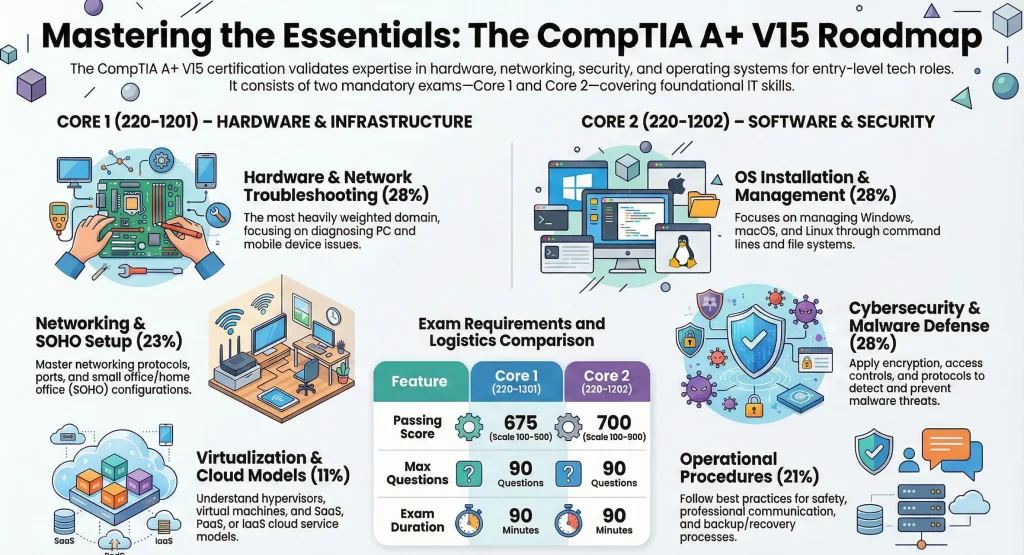
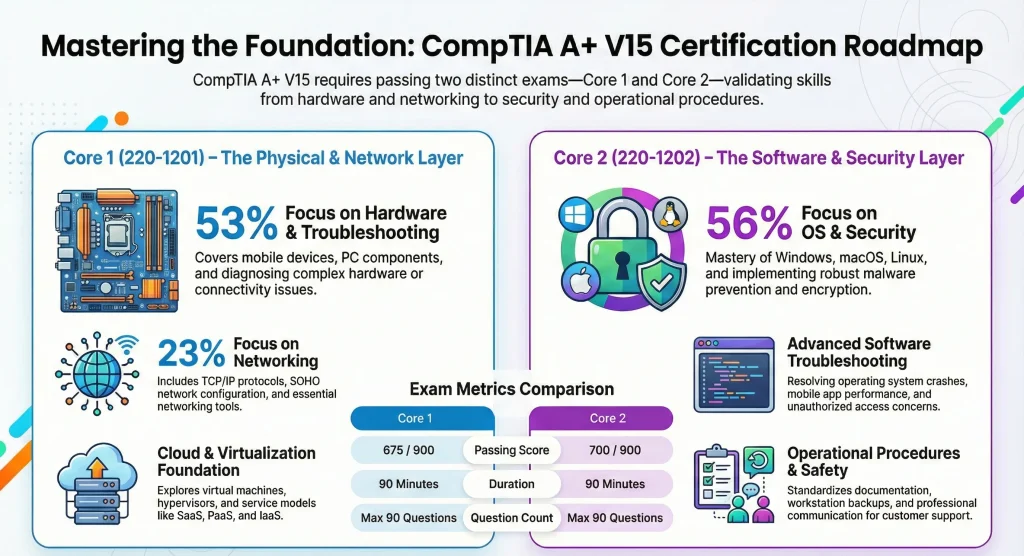
Core 1 (220-1201) vs. Core 2 (220-1202) Structure
The official exams are divided into two distinct parts. You cannot mix versions; you must pass both Core 1 and Core 2 from the same series (V15). The Core 1 domains and scoring sets out exactly what the first of those two papers covers.
| Feature | CompTIA A+ Core 1 (220-1201) | CompTIA A+ Core 2 (220-1202) |
| Focus | Hardware, Cloud, & Networking | OS, Security, & Software |
| Max Questions | 90 | 90 |
| Duration | 90 Minutes | 90 Minutes |
| Passing Score | 675 / 900 | 700 / 900 |
| Question Types | MCQs & PBQs | MCQs & PBQs |
The “Logic” Gap
Most CompTIA A+ practice questions found online focus on definition. They ask: “What is the port for HTTPS?” The real exam asks: “A user cannot connect to a secure website while others can. Which of the following should the technician check first?”
CompTIA tests your ability to troubleshoot, not just your ability to memorize. To succeed, you need to move beyond simple recall and start thinking like a Tier 1 Support Specialist. For a deeper dive into organizing your journey, check out our 2026 CompTIA A+ Study Plan.
Key Takeaway: Practice exams often test what it is; the real exam tests how to fix it.
2. Common Candidate Mistakes: Why Practice Scores Falsely Inflate
If you are scoring 90% on a free CompTIA A+ study guide quiz but feel lost when faced with a new scenario, you might be falling into these traps:
Memorizing the Question, Not the Concept
If you take the same practice test three times, you aren’t learning the material; you’re learning the answer key. When the real exam changes the wording or flips the scenario, candidates who memorized answers often fail.
Ignoring the Performance-Based Questions (PBQs)
PBQs are the “simulations” at the start of the exam. They require you to configure a SOHO router, map a network drive, or troubleshoot a RAID array in a virtual environment. Many practice sets only offer multiple-choice questions, leaving students completely unprepared for the high-point-value PBQs.
Mismanaging the Clock
On a CompTIA A+ practice exam, you might feel relaxed. In the testing center, with the 90-minute timer ticking down, panic can lead to “misreading” the “MOST likely” or “LEAST likely” qualifiers in the questions.
3. Bridging Strategy: How to Prepare for the Real Deal
To bridge the gap, you need a multi-layered approach that combines theory, high-quality simulation, and hands-on practice.
Step 1: Diversify Your Question Sources
Don’t rely on a single app or website. Use reputable sources that offer updated V15 questions.
- Practice with the Core 1 220-1201 Sample Questions to test your hardware knowledge.
- Challenge yourself with Core 2 220-1202 Sample Questions to see how you handle software and security scenarios.
Step 2: Master the CompTIA “Exam Voice”
CompTIA uses specific distractors (wrong answers that look right). To beat them:
- Read the last sentence first: Often, the first three sentences are “fluff.” The last sentence contains the actual requirement.
- Eliminate the “Impossible”: If the question asks about a hardware issue and one answer is a software setting, cross it off immediately.
- Identify the “Best” Answer: Sometimes two answers are technically correct, but one is the “industry standard” or “first step.”
Step 3: Get Hands-On Experience
CompTIA recommends 12 months of experience. If you don’t have that, build a “home lab.”
- Set up a virtual machine using VirtualBox.
- Disassemble an old laptop.
- Configure your home router’s security settings.
The more you do, the less you have to memorize. For more on the exam versions, see the official CompTIA A+ Core Series page.
4. What is the difference between a Practice Test and a “Dump”?
Warning: Avoid “brain dumps.” Not only do they violate CompTIA’s candidate agreement (which can lead to a lifetime ban), but they are often filled with incorrect answers.
Instead, use a legitimate CompTIA A+ practice test that explains why an answer is correct. This builds the foundational knowledge required for the 2026 CompTIA A+ 220-1201 & 220-1202 Exams.
5. Exam Day Readiness Checklist
Before you head to the testing center or log into your remote proctored session, ensure you have checked these boxes:
- [ ] Score Consistency: Are you scoring 85%+ on unfamiliar practice sets?
- [ ] PBQ Proficiency: Can you explain the steps to configure a wireless WPA3 network?
- [ ] Acronym Mastery: Do you know the difference between SaaS, PaaS, and IaaS without hesitation?
- [ ] Troubleshooting Methodology: Have you memorized the 6-step CompTIA troubleshooting process? (It’s the backbone of the exam!)
- [ ] Identity Prep: Do you have two forms of ID ready for the proctor?
6. How to Handle PBQs Like a Pro
Performance-Based Questions are often the difference between a 650 and a 700. Most candidates skip them and come back at the end.
Pro Tip from the Field:
“When you hit a PBQ, don’t panic. Look at the provided tools. If there is a terminal, try typing help. If it’s a drag-and-drop, look for the labels first. Most PBQs are simpler than they look; they just want to see if you can follow a logical sequence.” – IT Certified Expert Contributor
FAQ: Your CompTIA A+ Questions Answered
Q.1. What is the biggest difference between a CompTIA A+ practice exam and the real exam?
Ans.: The real exam emphasizes troubleshooting decisions, time pressure, and PBQs, while practice exams often focus on knowledge recall.
Q.2. Are practice exam questions identical to real CompTIA A+ exam questions?
Ans.: No. Practice questions are designed to reflect exam style but are not actual exam content.
Q.3. How many practice exams should I take before the real exam?
Ans.: Typically 3-5 full timed simulations are recommended, depending on consistency and confidence.
Q.4. Do free CompTIA A+ study guides work?
Ans.: They help with fundamentals, but advanced preparation usually requires realistic practice simulations.
Q.5. Are PBQs harder than multiple-choice questions?
Ans.: They feel harder because they require applied thinking, but structured practice reduces difficulty.
Q.6. How long should I prepare for Core 1 and Core 2?
Ans.: Preparation time varies, but many candidates study for several weeks to a few months depending on experience and schedule.
Conclusion: Closing the Gap Today
The journey from a CompTIA A+ practice exam to a digital badge on your LinkedIn profile is one of transition – from student to technician. By focusing on the “why” instead of the “what,” mastering the PBQs, and using high-quality sample questions, you can walk into that testing center with confidence.
Don’t let the gap intimidate you. Use it as a training ground. The real exam isn’t just a test; it’s your first day on the job.